Inbound Lead Processing Pipeline for Speed to Lead Automation

Mukesh Kumar
Software Engineer
Waiting more than 5 minutes to respond to a website inquiry cuts your qualification chances by 80%. This guide explains how to automate inbound lead handling end to end, from capturing form details to booking meetings automatically.
What Are Inbound Leads? Buyer Intent and Psychology
Understanding the inbound leads meaning is the first step toward building a scalable revenue engine. Inbound leads refers to a prospective customer who proactively contacts your company after finding your brand through organic search, authoritative content, peer referrals, or social channels.
In B2B marketing, effective inbound lead generation attracts buyers who are already problem-aware. When your team succeeds at generating inbound leads, prospects reach out with clear commercial intent: • They have already identified an active business challenge. • They are evaluating solutions on their own timeline. • They want to speak with someone qualified who can solve the problem.
What is Inbound Lead Automation?
Most enterprise buyers research solutions independently through search engines, technical write-ups, and peer reviews before reaching out. By the time someone submits a contact form, they have often completed up to 70% of their evaluation before ever speaking with a sales engineer.
Comparing Inbound vs Outbound Leads and ROI
Comparing inbound leads vs outbound leads highlights two very different approaches to buyer intent, costs, and sales velocity.
The distinction between inbound and outbound comes down to who makes the first move: • Inbound Leads (Pull Motion): The buyer seeks you out. High-performing B2B inbound lead generation relies on organic search, technical guides, and clear positioning so prospects find your solution and submit their contact details voluntarily. • Outbound Leads (Push Motion): Your sales team compiles a list of target companies and initiates contact through cold emails, phone calls, or LinkedIn outreach without prior relationship.
When handling inbound leads, responsiveness defines ROI. Because inbound prospects proactively search for solutions, teams that accelerate inbound leads with immediate automated follow-ups achieve up to 61% lower customer acquisition costs and 2x higher close rates compared to cold outbound campaigns.
| Comparison Factor | Inbound Leads (Pull Strategy) | Outbound Leads (Push Strategy) |
|---|---|---|
| Initiation of Contact | Buyer proactively contacts your business | Salesperson interrupts prospect via cold outreach |
| Sales Cycle Speed | Fast (days to weeks; existing budget & intent) | Slow (months; must create urgency) |
| Trust & Relationship | Pre-built trust from content, reviews & website | Zero initial trust; salesperson must overcome skepticism |
| Cost per Acquisition (CAC) | Compounding and up to 61% lower over time | Higher; ongoing costs for data lists, dialers & SDR seats |
| Sales Cycle Velocity | Significantly faster (weeks vs months) | Longer: requires multiple nurture touches and follow-ups |
| Average Conversion Rate | Typically 10% to 15% inquiry-to-close | Typically 1% to 3% cold-contact-to-close |
| Response Time Sensitivity | Extreme: responding <5 min drives 21x qualification | Lower urgency: prospect expects scheduled cadence |
Is Inbound or Outbound Better?
Neither approach is better on its own: • Inbound lowers customer acquisition costs, converts at higher rates, and builds buyer trust before the first conversation. • Outbound provides immediate pipeline control and proactive reach, letting your team target specific high-value accounts without waiting for organic traffic.
Balancing Both Approaches
6 High-Intent Channels for Inbound Lead Generation
For revenue operations and demand generation teams, mastering inbound lead generation means allocating budget and creative effort where buyer intent is highest. The most lucrative inbound lead generation channels include:
High-Performing Inbound Lead Sources:
- 1. Organic Search Engine Optimization (SEO & GEO)
Buyers researching high-intent commercial terms (e.g., 'AI development company India' or 'hire n8n expert') or technical solutions across Google, Bing, and AI search engines (ChatGPT Search, Perplexity).
- 2. Technical Thought Leadership & In-Depth Guides
High-authority blog articles, architectural blueprints, and comparison benchmarks that solve complex engineering problems and prove your hands-on expertise.
- 3. Conversational AI Chatbots & Live Chat
On-site conversational AI agents that engage visitors 24/7 and book meetings while the prospect is still on the page.
- 4. Social Selling & Industry Authority
Engineering leadership sharing case breakdowns, product teardowns, and architecture insights on LinkedIn, X, and YouTube that attract inbound direct messages.
- 5. Third-Party Review Platforms & Directories
Verified client reviews on platforms such as Clutch, GoodFirms, and Google Business Profile that direct buyers ready to make an immediate purchasing decision.
- 6. Bottom-of-Funnel Search Advertising (PPC)
Paid search campaigns strictly targeting commercial-intent queries where prospects are actively looking to hire a specialized engineering agency.

Why the 5-Minute Speed-to-Lead Window Decides the Deal
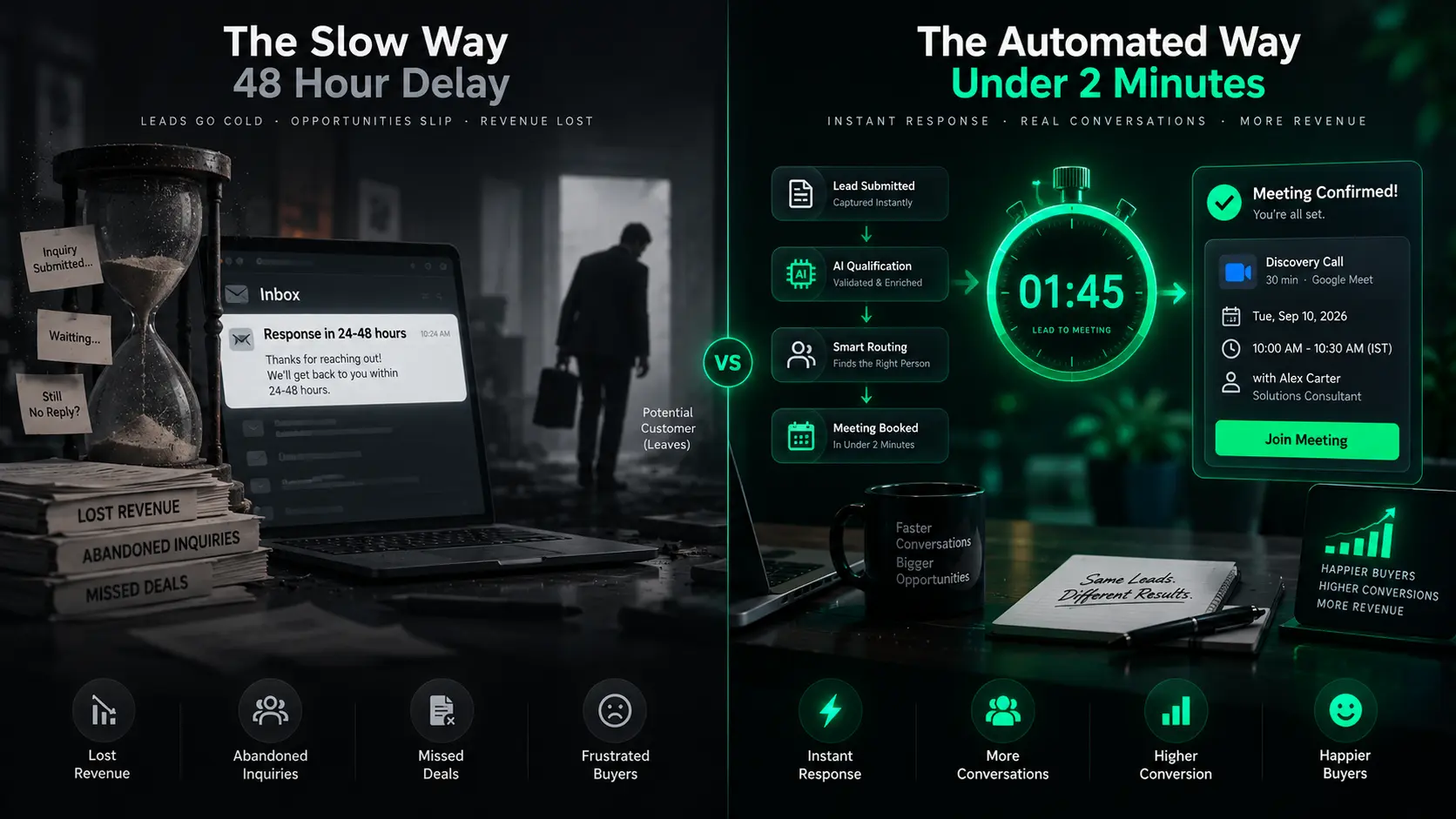
Consider two competing software agencies that receive the exact same inquiry from an enterprise buyer: • Company A sends an automated reply: 'Thank you! A sales representative will review your request in 24 to 48 business hours.' • Company B enriches the domain in two seconds and shows an embedded calendar on the thank-you page: 'Pick a 20-minute slot with our Solutions Architect today at 2:00 PM or tomorrow at 10:00 AM.'
Company B almost always books the meeting and controls the conversation. Data shows that over 78% of B2B buyers purchase from the vendor that responds first.
When handling inbound leads, time is the single greatest competitive advantage. If your organization takes hours to respond, your inbound pipeline suffers from severe decay. Automated systems that accelerate inbound leads ensure that high-intent prospects speak with a sales engineer before their attention shifts to a competing vendor.
The Harvard Business Review Benchmark
The Technical Architecture Under the Hood
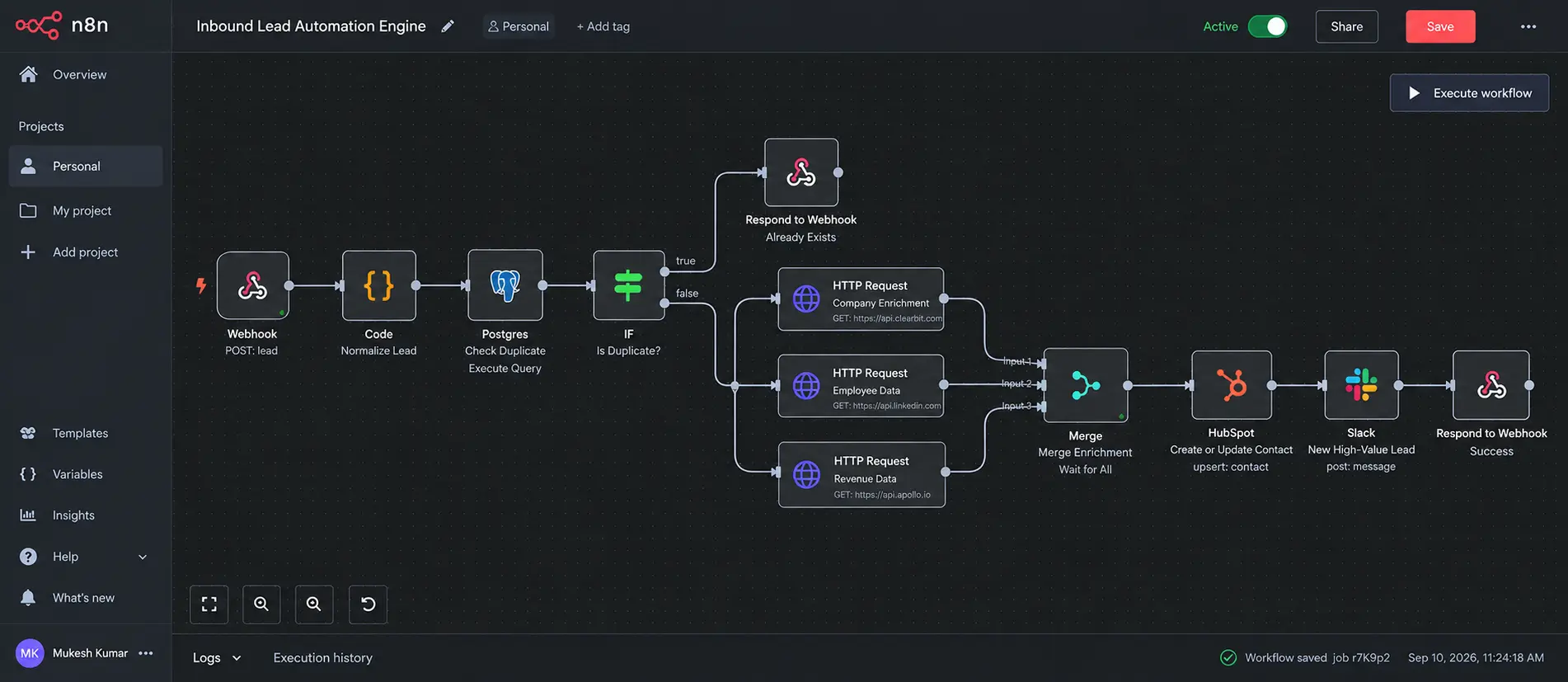
To achieve a sub-5-minute response time at scale, engineering and RevOps teams rely on an event-driven architecture for end-to-end inbound processing that connects web forms, background workers, and CRM APIs:
Core Architectural Building Blocks:
- 1. Webhook Ingestion & Inbound Forms Processing
When a visitor submits an inquiry, modern inbound forms processing triggers an API route handler or automation engine (such as a Next.js serverless route or n8n workflow) to sanitize and structure the payload in milliseconds.
- 2. Idempotency & Double-Click Protection
The system creates a deterministic hash from the email and timestamp. If a visitor taps 'Submit' multiple times on a mobile connection, duplicate CRM records are eliminated.
- 3. Background Enrichment & Validation
Fast API calls check MX records, verify deliverability, and fetch company details. If an enrichment provider experiences downtime, the core lead data is persisted safely first.
- 4. CRM Upsert Operations
Upserts contact and company objects in HubSpot or Salesforce without overwriting existing communication history or account ownership.
- 5. Real-Time Chat & Automated Call Dispatch
Dispatches instant alerts into dedicated Slack or Microsoft Teams channels with lead context and enriched metadata. For teams asking 'how do i route inbound calls to the right lead buyer automatically?' telephony webhooks can dynamically bridge phone callbacks directly to the right account executive or regional lead buyer.
The Golden Rule: Save the Lead First, Enrich Later
The 6-Stage Lead Processing Pipeline from Click to Calendar
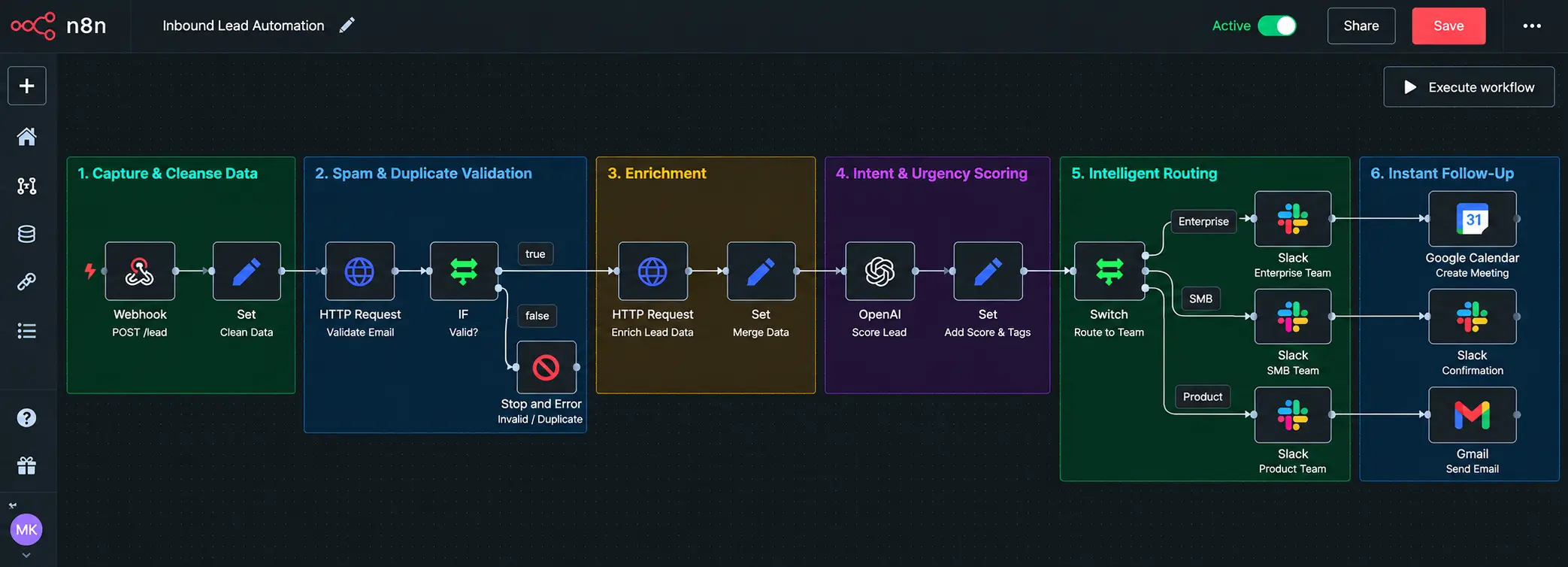
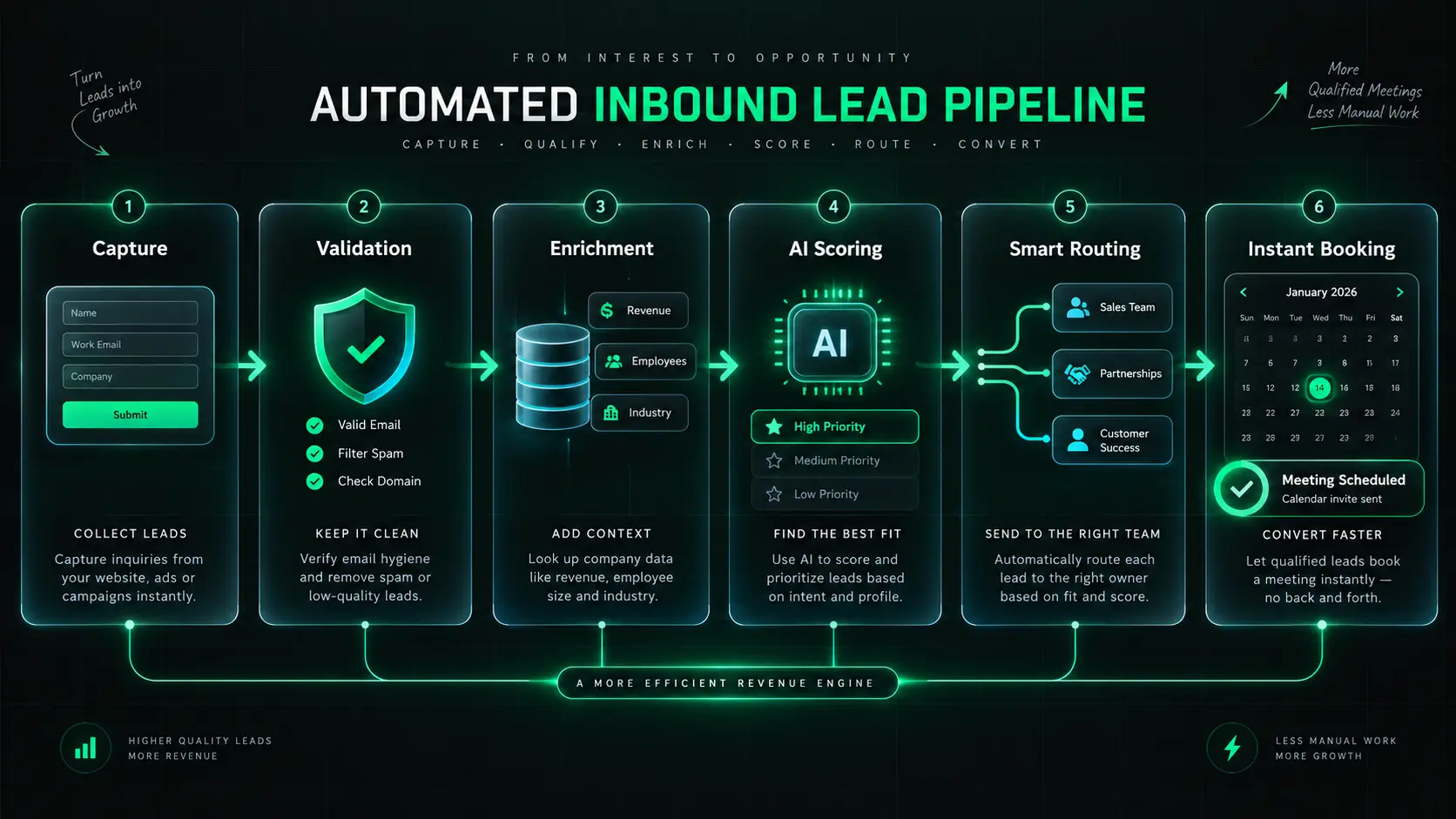
Revenue leaders frequently ask how to automate inbound lead handling end to end. The answer lies in orchestrating six modular stages that take an inquiry from raw form click to confirmed calendar booking in under two minutes. By establishing this event-driven workflow with inbound lead automation, revenue operations teams can manage inbound pipeline easily while eliminating data entry errors, delayed outreach, and lost opportunities:
The 6 Stages of an Automated Inbound Pipeline:
- 1. Capture & Cleanse Data
Ingesting incoming submissions from web forms, chatbots, or calendar widgets and formatting them into clean, standardized JSON objects.
- 2. Spam & Duplicate Validation
Filtering disposable email providers, detecting duplicate form submissions, and matching against existing CRM records.
- 3. Automated Inbound Lead Enrichment
Appending corporate details, employee counts, tech stacks, and industry classifications in under 1 second via background APIs.
- 4. Intent & Urgency Scoring
Evaluating target account fit and employing AI agents to read the prospect's message for urgent project timelines.
- 5. Intelligent Account Routing
Routing the lead directly to the optimal account executive based on territory, vertical expertise, and current team availability.
- 6. Instant Follow-Up or Calendar Booking
Presenting a live scheduling calendar on the thank-you screen or dispatching a personalized email from the assigned salesperson in under 60 seconds.
Stage 1: Keep Forms Short and High-Converting
Every extra question on a contact form reduces submission rates by 5% to 10%. If you require 10 fields (such as annual revenue, software budget, and employee headcount), qualified visitors will bounce. Modern inbound forms processing solves this friction: request only 3 or 4 fields (Full Name, Work Email, Phone, and Project Needs). Let background automation handle the remaining intelligence.
Stage 2: Filter Out Spam and Duplicate Submissions
Before any notification reaches your sales engineers, automated checks sanitize the incoming record: • Weed out disposable email addresses (e.g., Mailinator, 10minutemail). • Validate telephone numbers against ITU international formatting using tools like libphonenumber. • Check if the company or contact is already owned by an account executive in your CRM. This keeps your pipeline clean and avoids awkward duplicate outreach.
Stage 3: Automatically Enrich Leads in Seconds
Because your capture form only requested basic contact info, the backend workflow extracts the corporate email domain (e.g., @domain.com) and queries business intelligence databases. In less than one second, your CRM records the prospect's industry, company size, headquarters, annual revenue, and technologies used, giving your sales engineer full context without burdening the buyer.
How Background Enrichment Works
Stage 4: Score Intent, Fit, and Urgency
Not every inquiry represents an enterprise software engagement. Legacy scoring used arbitrary point systems (+5 points for clicking a link). Modern setups use automated scoring and AI agents to analyze the unstructured message text, accelerating the transition from MQL (Marketing Qualified Lead) to SQL (Sales Qualified Lead). If a prospect writes: 'We have 500 team members and need to build a custom LLM knowledge base by next month,' the AI model instantly tags it as tier-1 enterprise priority. If a submission is an academic research query, it is gracefully directed to self-serve resources.
Stage 5: Intelligent Account Routing
A frequent question in RevOps is how to match inbound leads automatically? Advanced routing engines inspect the lead's enriched corporate domain and tax ID against existing CRM account hierarchies to identify existing client relationships and avoid sales conflicts. Dynamic routing rules ensure every opportunity reaches the optimal rep without manual reassignment: • By Geography: North American accounts route to US/Canada team members; APAC inquiries route to regional specialists. • By Vertical: Healthcare AI inquiries route to solutions architects experienced with HIPAA compliance. • By Real-Time Availability: Round-robin queues check live calendar availability and assign leads only to active salespeople ready to respond. For voice inquiries, teams asking 'how do i route inbound calls to the right lead buyer automatically?' use smart IVR and phone API rules (such as Twilio or Kixie) to route incoming callers directly to the assigned account executive or certified lead buyer based on account territory and lead score.
Stage 6: Instant Follow-Up or Calendar Booking
When determining how to automate inbound lead engagement? the key is immediate multi-channel execution. Display an embedded calendar directly on the confirmation screen so the buyer can schedule a discovery call while their interest is at its peak. If the prospect exits without booking a slot, trigger a personalized email sequence from the assigned account executive within 90 seconds referencing their stated project goals and offering direct calendar links.
4 Mistakes That Kill Inbound Conversion Rates
A few common production edge cases regularly cause lead pipelines to leak opportunities. Here are four mistakes to watch for and how to fix them:
1. Blocking Personal Emails (@gmail / @yahoo)
The Mistake: Hard-blocking anyone who submits with a non-work email address.
Why it hurts: Over 35% of senior decision-makers research vendors on mobile devices using browser autofill. If your form rejects their submission with an error message, they bounce directly to your competitor.
The Smart Fix:
- Accept personal email submissions without showing errors.
- Query company databases using the company name field.
- Trigger an automated reply politely asking where to send the enterprise scoping doc.
2. Spamming Your Sales Slack Channel (Alert Fatigue)
The Mistake: Routing every newsletter signup, eBook download, and vendor pitch into your primary sales channel.
Why it hurts: When a channel pings 50 times a day with low-intent noise, team members mute notifications. Real enterprise inquiries sit untouched for hours.
The Smart Fix:
- Restrict real-time Slack alerts strictly to high-intent demo requests.
- Include enriched company size, revenue, and vertical directly in the alert card.
- Add a 1-click 'Claim Lead' button so the entire team sees who owns the follow-up.
3. No Backup Plan When Salespeople Are Busy
The Mistake: Assigning a lead to a team member without checking whether they are currently in a client meeting or on vacation.
Why it hurts: If the assigned salesperson is tied up for 2 hours, that crucial 5-minute response window vanishes completely.
The Smart Fix:
- Set an automated 10-minute SLA countdown timer.
- If the assigned team member does not claim the inquiry in 10 minutes, reassign it to an active backup.
- Check live calendar availability before routing.
4. The Weekend & After-Hours Ghost Town
The Mistake: Letting incoming inquiries sit dormant from Friday evening until Monday morning.
Why it hurts: Over 40% of B2B inquiries arrive outside local 9-to-5 working hours or from international time zones. Waiting until Monday morning creates an unacceptable 60-hour delay.
The Smart Fix:
- Enable 24/7 self-service calendar scheduling on the confirmation page.
- Dispatch an immediate confirmation email from a named team member within 60 seconds.
- Let buyers lock in a meeting slot right away instead of waiting across the weekend.
4 Core Metrics to Measure Pipeline Health
To manage inbound pipeline easily and maintain healthy sales velocity, revenue leaders should monitor these four core metrics on their operations dashboard:
- 1. Time to First Touch (Speed-to-Lead)
The exact duration between form submission and the first personalized human outreach or booked call. Benchmark: under 5 minutes for high-intent inquiries.
- 2. Lead-to-Meeting Rate
The percentage of visitors who fill out your form and successfully confirm a meeting on a salesperson's calendar. Target: 40% to 65% when offering instant booking.
- 3. Lead Leakage (Untouched Inquiries)
The percentage of inbound leads that sit without outreach for over 24 hours. In an automated system, lead leakage should be 0%.
- 4. Sales Team SLA Compliance Rate
The consistency with which your team contacts inquiries within your defined response window during operational hours.
Key Takeaways on Automating Your Inbound Engine
Inbound leads convert faster than cold outreach because buyers reach out when they actively need help. If you wait hours or days to reply, the prospect is usually already talking with another vendor.
Mastering inbound lead management transforms your website from a passive brochure into an active revenue engine. When your team implements inbound lead automation, manual data entry, lost inquiries, and delayed notifications are eliminated so your sales engineers can spend their time consulting qualified buyers.
At Starling Elevate, we build workflow automation systems that connect web forms, data enrichment APIs, CRM instances, and team alert channels into reliable pipelines. If you want to cut response times and capture more inquiries, our engineering team is ready to assist.

Want to Eliminate Lead Leakage and Cut Response Times to Seconds?
Schedule a Free Pipeline Architecture ReviewFrequently Asked Questions
An inbound lead is a prospective customer who proactively contacts your company after finding your brand through marketing channels such as organic search, content, social media, or referrals. The inbound leads meaning and inbound lead meaning focus on buyer-initiated intent: the prospect seeks out your solution because they have an active business challenge.
Table Of Contents

Driving Innovation and Impact
With engineering leadership and a proven delivery model, our journey is marked by a relentless pursuit of excellence and a commitment to driving measurable ROI for our clients across 10+ diverse industries.
Let's Connect